7 Tips for Choosing the Perfect CRM for Your Franchise Network


Choosing the right customer relationship management (CRM) for your franchise network can feel like a big decision, and honestly, it is. The tools you choose shape how smoothly your locations run, how quickly new franchisees get up to speed, and how confidently you can make decisions based on what is actually happening across your network. A good franchise CRM does more than store customer details. It becomes part of how your business operates day to day, helping every location deliver a reliable experience, follow your processes, and grow without constant hand-holding.

Franchisors often explain the difference like this. Before the right CRM, every location does things its own way. After the right CRM, the entire network starts moving in sync. That happens because a franchise‑focused system gives both franchisors and franchisees what they need to work more efficiently. It centralizes communication, automates routine steps, and keeps everyone focused on the work that actually drives growth.
So in this guide, we are going beyond a basic feature list. You will find practical, experience-backed insights to help you understand what to look for when choosing a CRM and how to evaluate each option with real franchise operations in mind.

Tip #1: Choosing Between a Franchise CRM and a Standard CRM
Running a franchise is rarely simple. You are balancing brand standards, location performance, onboarding, marketing, customer communication, and reporting, all while supporting owners at very different stages of experience. A standard CRM can track contacts or deals, but it often falls short once territories, shared processes, and network-wide visibility are part of the picture.
This table gives you a quick feel for why a standard CRM usually cannot keep up with the realities of a multi-location brand.
What Makes a Franchise CRM Different
A franchise CRM is built with the everyday challenges of a multi-unit brand in mind. You will typically see features like:
- Centralized visibility across all franchisee accounts
- Local accounts with access levels that match each franchisee’s role
- Real-time reporting and performance dashboards
- Shared marketing templates and assets
- Territory-based lead routing automation
- Multi-location sales pipelines
These capabilities keep your system working as one, instead of forcing you to piece together separate tools or track information manually.
What Standard CRMs Handle
Standard CRMs usually work well for single-location businesses and often include:
- Basic lead and pipeline tracking
- Contact records
- Task and appointment tools
- Standard automation
- Third-party integrations
They are helpful, but they are not built for the layered structure of franchise operations. The International Franchise Association notes that multi-location brands depend on centralized systems and consistent workflows to maintain brand standards and support franchisee performance. That level of coordination is difficult to achieve with a general-purpose CRM.
Why This Distinction Matters
You have likely seen what happens when every franchisee manages leads and processes differently. Follow-up becomes unpredictable. Reporting becomes unreliable and very time-consuming. Comparing performance becomes guesswork. Once a network shifts to a franchise ready CRM, those gaps tend to close. Franchisees gain a shared playbook, and you gain clear visibility across locations.
So if your network depends on shared templates, consistent workflows, or centralized reporting, a standard CRM will eventually slow you down. A franchise CRM gives you room to grow without losing structure.

Tip #2: Understand Your Franchise Needs
When you step back and look at the day-to-day realities of your franchise, a few core needs always rise to the surface. Your industry, your onboarding process, your reporting requirements, how your team communicates, and how your marketing works all play a role in shaping the type of CRM that will actually support you. These questions help you narrow in on the features that matter most for how you operate and how you plan to grow.
Before you compare software, it helps to get really clear on what you need. Think of this as the foundation. When you know what matters, choosing the right CRM becomes a lot easier. A good CRM should feel like an extension of how your franchise already works, not something you have to fight or adapt around.
So let’s break this down. Start by looking at your operational priorities:
- What type of franchise do you run, such as service, coaching, retail, wellness, home-based, or mobile?
- Which workflows constantly get bogged down, like onboarding, lead routing, communication, or reporting?
- Do your franchisees need built-in marketing tools, such as email, SMS, forms, or automations?
- Are manual tasks slowing down onboarding or creating delays for your sales team?
- Do you need better ways to keep brand communication consistent across locations?
You have probably experienced how quickly things pile up when each location handles onboarding or communication in its own way. Some teams rely on spreadsheets, others use email threads, and some create their own workarounds. It works for a while, until it doesn’t. That is usually the moment franchisors realize they need a system that brings everyone onto the same page.
Your CRM should support your day-to-day operations and make future growth easier, not harder. Getting clear at this stage sets you up to choose software that can carry your franchise forward and grow with you.
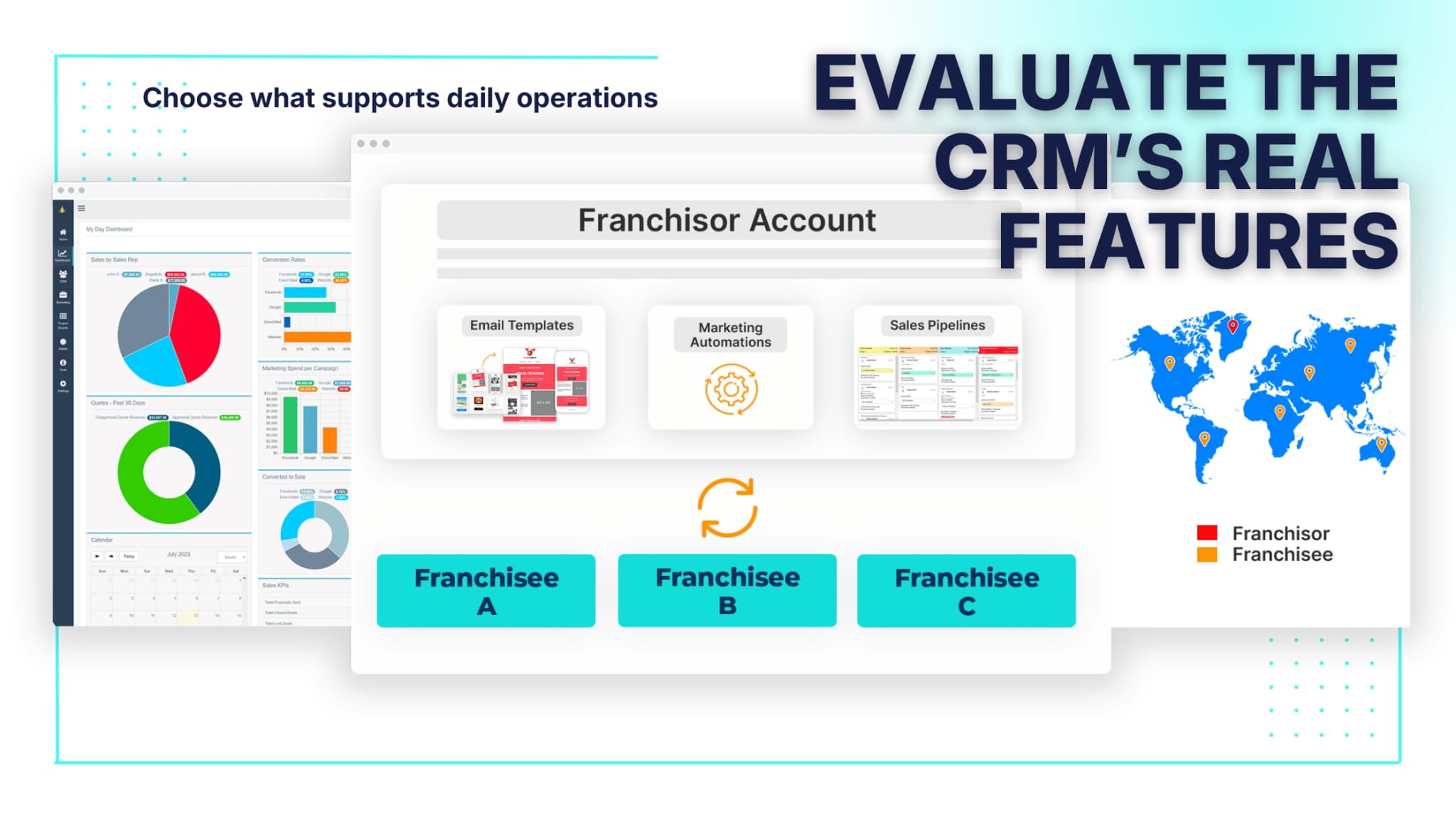
Tip #3: Evaluate the Software Features
By this stage, you already know what your franchise needs. Now the real question is, does the CRM actually help you run the day-to-day work in a smoother, more predictable way? On paper, most platforms look similar. Once you dig in, you start to notice how differently those features actually behave in real life. So let’s walk through this the same way you would if we were sitting together, talking through what matters.
A helpful way to ground yourself is to think about the little moments that slow your team down. Where do mistakes happen? Where do people lose information? Which tasks feel repetitive? The best CRM removes friction rather than adding to it. If a new franchisee can jump in, learn the system quickly, and follow your workflows without confusion, you're on the right track.
Core CRM Features
Here are the baseline features you should expect:
- A centralized database that gives you full visibility
- Lead and pipeline tracking for franchise sales and customer sales
- Territory and segmentation tracking
- Customer history and communication logs
- Notes, tasks, and internal form features
When everyone uses a single source of truth, you avoid the messy mix of spreadsheets, disconnected tools, and missing context. It also makes coaching franchisees easier, because you can actually see what is happening across locations.
Usability and Adoption
Here’s the thing. If the CRM feels clunky, your franchisees will avoid it. That usually shows up as incomplete records or important tasks slipping through the cracks.
A CRM needs to be simple enough that even a brand-new franchisee can learn it without a week-long training session. One way to test this is to run a small pilot group before rolling it out network-wide. Their feedback will quickly show you where confusing workflows or navigation gaps exist. A platform that looks good in a demo is nice, but one that holds up in real conversations, under deadlines, and on busy days is what actually matters.
Flexibility
As your franchise grows, your CRM should adjust with you. Look for systems that let you:
- Create custom fields that fit your model
- Build multiple pipelines based on your services or sales processes
- Modify automation settings when your processes change
- Update permissions as roles and responsibilities shift
The more flexible the system, the less time you spend creating workarounds. And when you expand into new verticals or open locations in different markets, that flexibility becomes even more valuable.
Integrations
Smooth operations depend on tools that can communicate with each other. You want a CRM that connects naturally with the software you already use, such as:
- Scheduling software
- Payment processors
- Advertising platforms
- Accounting tools
Good integrations reduce manual entry, prevent missed handoffs, and keep customer information clean. The International Franchise Association notes that franchise systems with centralized, integrated tools tend to perform better and execute more consistently. That’s because franchisees spend less time juggling platforms and more time serving customers.
If you want guidance on managing pipeline-centered workflows, this resource can help: Sales Pipeline Management Best Practices.
Security
Security becomes more important as your network grows. You want a CRM that handles sensitive information responsibly by offering:
- Role-based permission controls
- Secure data storage
- Controlled access for franchisees
Strong security helps protect your customers, your franchisees, and your brand. You reduce risk, you stay compliant, and you give your network confidence that their information is handled with care.
Tip #4: Explore Feature-Level Specifics
To make this section easier to skim, here is a quick visual summary before we dig in.
These features might look simple on paper, but they shape the everyday rhythm of your franchise. So let’s break down why this part matters and how to evaluate each tool in a way that feels practical instead of overwhelming.
Exploring feature-level specifics is really about understanding how information moves through your business. When you look at it that way, gaps and inefficiencies start to stand out. Maybe leads sit in inboxes. Maybe team members do not always have the same customer history. Maybe a new franchisee spends too much time figuring out how to follow your processes. Strong CRM features close these gaps, while weaker ones tend to magnify them.
A helpful place to start is by asking yourself a few grounding questions:
- How quickly do leads reach the right franchisee?
- When a customer calls, does every team member have the same story in front of them?
- Do franchisees have access to templates that help them stay on brand?
- Can a new owner follow your processes without reinventing the wheel?
These questions point to where a CRM can smooth out your workflow and where it may introduce friction.
Lead Tracking and Management
Lead handling is often where franchises either gain or lose momentum. To make this easier, think of it as a four-step flow that should feel natural, not forced.
- Capture: Leads should flow in automatically from forms, ads, and your website.
- Route: The system should assign leads to territories without you having to sort them.
- Follow-up: Tasks or messages should cue up automatically so nothing is missed.
- Measure: You need quick access to response time and conversion data to spot opportunities.
If any of these steps break down, you end up with slow follow-up, inconsistent data, or leads slipping through the cracks.
Contact Management
Contact management is more than keeping names and phone numbers in one place. You want a system that helps your team stay on the same page every time they talk to a customer.
Look for features that help you check these boxes:
- A clear communication history for each contact
- Logged calls, emails, texts, and notes
- Easy access for anyone who needs to step into the conversation
When everyone can see the full picture, conversations flow more smoothly and customers have a better experience.
Access to SOPs and Resources
If you have ever had to repeat the same instructions to multiple franchisees, you already know how much smoother things run when everyone can access the same materials. What really matters for most franchisors is having a single place to store the resources your network depends on.
A few things to look for:
- A shared library for templates, brand guides, and SOPs
- Easy ways for franchisees to access what they need without sending you repeated requests
- Clear organization so new owners can quickly find the right documents
When these resources are centralized, franchisees spend less time searching, onboarding becomes easier, and your day-to-day operations stay more predictable.
Form Builders
Forms are often the first point of contact with potential customers, so building and managing them should not feel complicated.
Here are a few questions that help you evaluate form builders:
- Can franchisees build and edit forms on their own?
- Do submissions flow straight into the CRM?
- Can forms support different scenarios, such as lead capture, event sign-ups, or surveys?
The easier this process feels, the more consistent your data will be across locations.
Marketing Tools
Marketing tools vary widely across CRMs, so take a moment to ground yourself before comparing features. The goal is to give franchisees tools they will actually use.
Look for features like:
- Easy-to-use email and SMS tools
- Templates that help maintain brand consistency
- Automation for follow-up and campaigns
- Engagement metrics that show what is resonating
If you want ideas for building simple automated journeys, explore this guide: Marketing Funnel Automation.
Appointments and Tasks
How teams manage appointments and tasks has a big impact on how smoothly each day runs. Start by noticing how your franchisees currently handle schedules and responsibilities. Then compare it with what the CRM can offer.
Look for:
- Centralized calendars for each location
- Automated reminders for key tasks
- Quick task creation during customer interactions
- Visibility for managers who need to monitor progress
When these tools work well, teams stay organized and fewer commitments fall through the cracks.
Tip #5: Ensure the CRM Has Workflow and Marketing Automation
Automation plays a huge role in keeping your franchise running consistently across every location. When the busywork is handled automatically, teams can focus on real conversations, real customers, and real results. So let’s break this down in a way that feels practical.
Workflow Automation
Here’s where automation makes your everyday work feel lighter. A strong CRM should automatically handle tasks like:
- Franchisee onboarding
- Customer follow-up
- Lead status updates
- Task creation
- Notification and alert triggers
You have probably seen how manual follow-up slows everyone down. Spreadsheets get messy, reminders get missed, and leads fall through the cracks. When these steps run independently, your team moves faster and makes fewer mistakes. It also means new franchisees step into a cleaner workflow from day one.
Marketing Automation
Marketing automation is another area where a little structure goes a long way. Look for tools that help you:
- Create automated campaigns for new leads
- Send nurture sequences based on customer behavior
- Communicate with franchisees at scale
- Trigger messages when deals move through the pipeline
These tools take pressure off busy owners who are already juggling operations. Instead of worrying about what email goes out next, they can rely on a system that keeps the conversation going.
Real-Time Reporting and Analytics
Once automation is in place, reporting becomes even more useful. Your CRM should help you:
- Identify top-performing franchisees
- Flag locations that may need coaching
- Measure conversion rates
- Forecast upcoming growth
This is where the data starts working for you. Instead of guessing why certain locations are thriving or struggling, you get clear, real-time insights you can act on. Industry research from the International Franchise Association shows that franchise networks with clear systems and well‑structured processes tend to operate more consistently and perform at a higher level.
Put simply, automation helps your franchise run smoothly, stay more organized, and make smarter decisions without adding extra work to anyone’s plate.
Tip #6: Look for Franchise Management Capabilities
Here’s where things really come together for multi‑location brands. Franchise management capabilities are the tools that help you guide your network without micromanaging it. They give you structure, they give franchisees room to run their day, and they make it easier for everyone to work from the same playbook. Think of this section as the backbone of what makes a CRM “franchise‑ready.”
A good way to look at this is to ask yourself where friction tends to show up. You have probably dealt with uneven reporting, processes that vary from location to location, scattered communication across emails or chats, and the headache of figuring out who should have access to what. Strong franchise management features remove that friction by giving you a consistent framework to work from.
Look for systems that include:
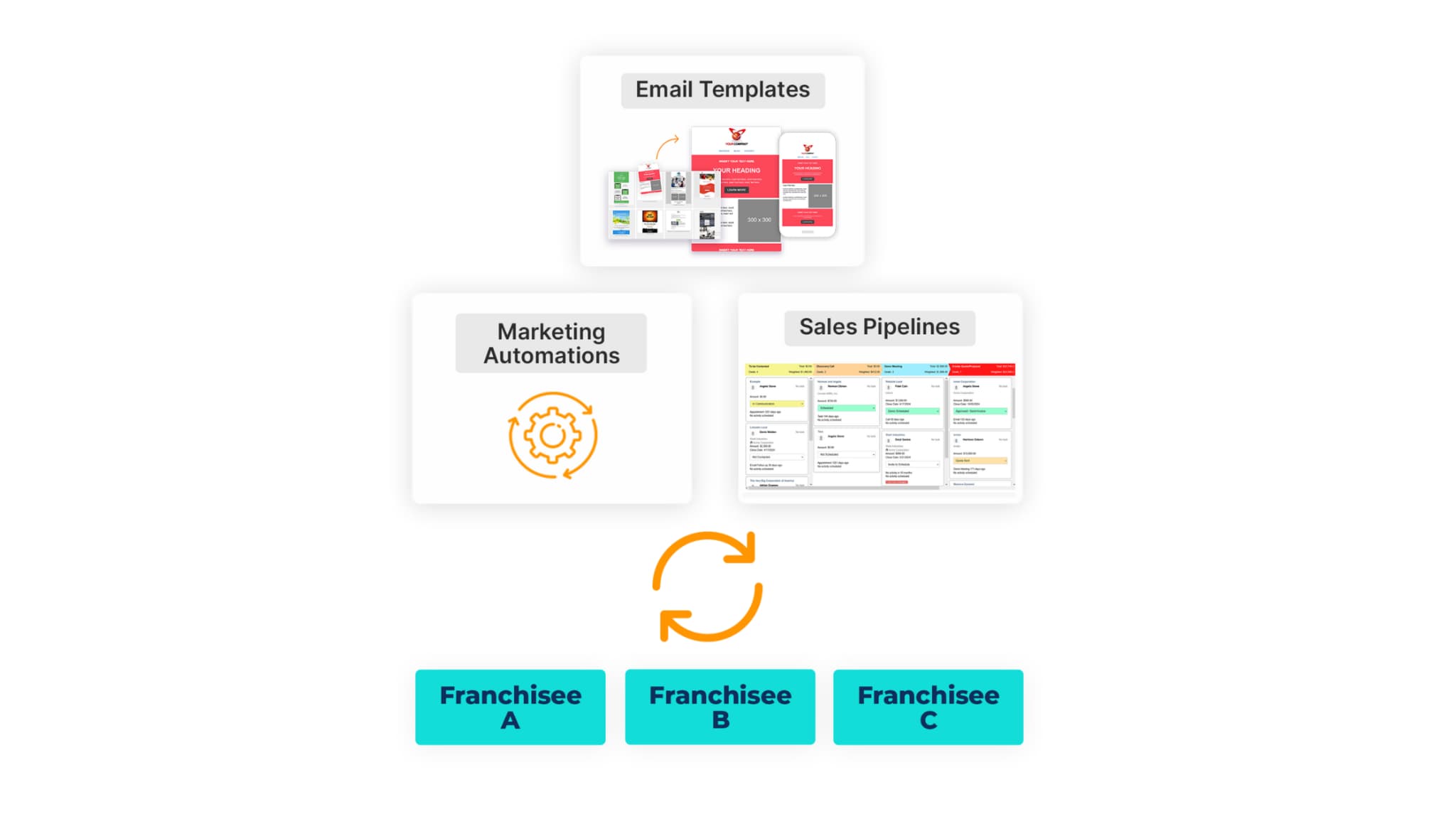
- Multi‑location account structures, so you can see every location from one place and manage them individually or in groups.
- Territory and segmentation views, which help you understand how regions or service areas are performing.
- Performance dashboards give you a quick read on sales activity, trends, and overall health.
- Resource libraries, which house SOPs, brand standards, training docs, and templates.
- Franchisor‑level permissions and overrides, so sensitive information stays protected and franchisees only see what they truly need.
Each of these features has a clear job. Multi‑location structures let you scale without losing sight of what’s happening. Segmentation views make comparisons easier and help you spot trends. Shared hubs and resource libraries reduce repetitive questions and help new franchisees have a smoother ramp‑up. Permissions keep your system clean and organized, and they protect data without slowing teams down.
Here’s where this matters long term. When every franchisee uses the same templates, follows the same processes, and references the same materials, your brand becomes more consistent and easier to grow. Customers feel the difference, and so do your future franchisees. The International Franchise Association points out that standardization is one of the biggest drivers of sustainable expansion in franchise systems.
If you want to see how performance tracking fits into the bigger picture, you can explore this guide on pipeline visibility: Sales Pipeline Management Best Practices.
When these pieces come together, you end up with a network that is easier to support, coach, and grow. It is one of those areas where the right structure makes everything else feel lighter.
Tip #7: Consider the Cost
Pricing varies a lot from one CRM to another, which is why comparing them can feel a bit overwhelming at first. So here’s the thing. Instead of focusing only on the monthly subscription price, consider how the cost fits into the bigger picture of your franchise. You want a CRM that supports you today and continues to make sense as your network grows.
A simple way to get started is to look at the basics:
- Whether the CRM charges per user, per location, or per feature
- Which tools come standard in the base plan
- What requires add-ons or upgrades
- How pricing changes as new franchisees join
Once you understand the structure, take a closer look at how pricing influences adoption. When a CRM relies on too many add-ons or outside tools, franchisees often skip upgrades to save money. On the surface, it seems harmless, but it usually leads to inconsistent usage and uneven data. That inconsistency makes it harder to coach franchisees and harder for you to get accurate reporting. A predictable pricing model usually leads to higher adoption because everyone works with the same tools.
You have probably seen how the hidden costs add up when teams use disconnected systems. The time it takes to manage multiple tools, train people on several platforms, or fix mistakes caused by manual work can easily outweigh the cost of the CRM itself. This is why it helps to think in terms of total cost of ownership rather than sticker price.
If you want to see the cost from an operational angle, it may be helpful to look at how automation reduces busywork across a network.
Finally, think about how pricing holds up as you expand. Some CRMs seem affordable at first, but become expensive once you add locations or require more features. A sustainable pricing model should support growth without penalizing you. When every location has access to the same tools, your network becomes easier to manage, coach, and scale.