
8 Proven Strategies to Increase Your Email Open Rates in 2026


Email is still one of the most dependable ways to reach your audience, but getting people to actually open what you send can feel like a moving target. You have probably crafted an email you were proud of, only to watch it get ignored because the timing was off or the message didn’t land the way you hoped. The good news is that small shifts often make a big difference.
This blog post outlines eight strategies to increase your email open rates for a successful email marketing campaign.

What Is an Email Open Rate and What’s Considered Good Today?
Your email open rate is the percentage of recipients who opened your message. On the surface, that sounds straightforward. But if you have ever watched your numbers jump one week and dip the next, you know there is more going on behind the scenes. So let’s break this down in a way that actually helps you make decisions.
Open rates are shaped by a handful of things, like whether your emails land in the inbox, whether your list is healthy, and whether your message feels relevant in the moment. After privacy updates like Apple Mail Privacy Protection, the number itself became more of a guide than an exact metric. That means you do not need a perfect score. What you want is a trend you can trust.
Here’s where this matters. When open rates rise, it usually means your emails are landing where they should, and your content is hitting the right notes. When they fall, it is often your list quality, segmentation, or deliverability that is asking for attention.
A practical way to understand your numbers is to compare how different segments behave. You might notice that new subscribers open more because they are still getting familiar with your brand. People who clicked a link last week tend to stay engaged. Contacts who have gone quiet for a while, not so much. Watching these patterns side by side gives you a clearer picture than looking at one overall number. You can check these trends anytime inside Pulse Reporting.
Here’s a simple breakdown of how typical segments perform and what their open rates usually signal.
Before we get into the first strategy, it helps to know what a “good” open rate looks like in your industry.
Email Open Rates by Industry
You’ve probably compared your open rates to a general benchmark and felt unsure whether you were doing well or falling behind. The truth is, open rates vary widely by industry, audience expectations, and the frequency of email sends. Comparing your results to similar businesses gives you a much more realistic reference point.
The table below summarizes average email open rates by industry, based on aggregated research compiled by Statista and industry analysis from the Data & Marketing Association (DMA). These organizations aggregate data across providers rather than reporting on performance from a single platform, which makes the benchmarks more neutral and broadly representative. Use these ranges as directional context, not rigid targets.
These ranges reflect patterns reported in Statista’s aggregated email marketing datasets and DMA industry benchmarking reports.
If your numbers fall below your industry range, it usually points to opportunities around relevance, list quality, or deliverability. If you are above the range, it is a strong signal that your audience trusts your emails and finds them worth opening. Either way, these benchmarks give you a grounded reference point for setting expectations.
Before we get into the first strategy, remember this: your open rate starts with the very first impression. That begins at the subject line.

1. Write Clear and Specific Subject Lines
Subject lines set the tone for everything that happens next. If the line does not spark interest or make sense right away, your email never gets a chance. You have probably felt this yourself when scanning your inbox. You pause on messages that promise something useful or familiar. You skip the ones that sound vague or pushy.
Here’s the thing. Clear and specific subject lines usually win because they help people decide quickly whether an email is worth opening. A subject line that says what you actually mean is far more effective than something clever that forces the reader to guess. Research from the Nielsen Norman Group backs this up, showing that people scan inboxes in seconds and rely on quick cues to judge relevance.
A simple way to improve your subject lines is to think about what your reader is dealing with in that moment. If you can name a task they are about to tackle or a problem they want off their plate, they are much more likely to open.
Here are a few examples that bring this to life.
- “3 ways to reduce no-shows this week”
- “We noticed something in your pipeline…”
- “For service businesses growing past spreadsheets…”
Below is a quick breakdown of common subject line types and the patterns they follow.
So if you want to get a better feel for what resonates, compare how these different styles perform across your audience. You can review open rate trends inside your email marketing dashboard and adjust based on what your readers respond to most.
You’ve strengthened the subject line, so the next challenge is making the message feel like it was meant for the person reading it.
2. Personalize Beyond the First Name
Using someone’s name is fine, but it barely scratches the surface of what real personalization can do. You and I both know what it feels like to get an email that clearly has nothing to do with what we actually need. So let’s break this down. Personalization works best when it reflects what someone is doing, thinking about, or trying to solve right now.
Here’s where this matters. Context always beats guesswork. When you send an email that matches a recent action, like a page someone viewed or a resource they downloaded, it feels timely. The same goes for the lifecycle stage. A new lead needs a different nudge than someone who has been comparing options for weeks. These small shifts in message focus can make your email feel more relevant rather than random.
Modern personalization aligns messages with:
- Interests
- Buyer stage
- Behavioral triggers
- Tags or custom fields
To make it easier, here is a quick look at common personalization types and when each tends to shine.
You can easily manage and tweak these details in a CRM contact management system. The more you treat personalization as a way to meet people where they are, the more your messages feel like a natural part of their day instead of another inbox interruption.
Once your emails feel more personal, the next step is making sure they actually reach the inbox.
3. Improve Deliverability With Domain Authentication
You can write the best email in the world, but if it never makes it to the inbox, none of it matters. That is why deliverability deserves more attention than most teams give it. Think of authentication as your way of telling inbox providers, “Yes, this message really came from us.” When that trust is in place, everything else gets easier.
So let’s break this down. Inbox providers want to protect their users from spam and spoofing, and authentication helps them sort legitimate senders from bad actors. When you set up SPF, DKIM, and DMARC, you are essentially proving you are the real sender. Once that proof is in place, providers are far less likely to push your emails into spam or low-priority tabs. According to Google Postmaster Tools, authenticated domains tend to maintain stronger reputations, which means better inbox placement over time.
If an unauthenticated domain starts getting more bounces, or emails suddenly land in spam after a short burst of activity, these issues can stack up quickly. Once your sender reputation dips, climbing back out can take weeks.
Here are the core elements you’ll want in place before you can count on consistent inbox placement.
- SPF (sender authorization)
- DKIM (message integrity)
- DMARC (protection against spoofing)
- Consistent sending volume
- List hygiene
Here is a quick look at what each protocol does and why it matters.
Getting these fundamentals right removes a major barrier between you and your audience. Once your domain is authenticated, your content has a real shot at being seen. And that is the whole point of sending emails in the first place.
With deliverability handled, you can now focus on sending the right message to the right people.
4. Segment Your Audience by Behavior and Intent
If you have ever wondered why some emails feel perfectly timed while others fall flat, segmentation is usually the reason. When you send the same message to everyone, it is easy for your content to miss the mark. But when you adjust your emails based on what people are actually doing or looking for, everything starts to click. So let’s break this down in a way that helps you make smarter choices without overcomplicating your workflow.
Here’s where this matters. People pay attention when a message reflects their current situation. Someone who clicked a pricing page is in a totally different mindset than someone who just joined your list yesterday. When you treat these groups the same, you lose engagement. When you address them differently, open rates naturally rise because the email feels like it belongs in their inbox.
Here are a few practical ways to group your audience so your messages land with more intention.
- Lifecycle stage segmentation
- Segments based on clicked links or page views
- Tags like “New Lead,” “Customer,” or “Inactive”
To make this easier, here is a quick overview of common segmentation types and when they tend to work well.
So the next time you plan a campaign, start by asking yourself: What is this group trying to do right now? When you build from that place, your emails feel more natural, and your results improve without extra effort.
After segmenting your audience, timing becomes the next big opportunity to boost engagement.
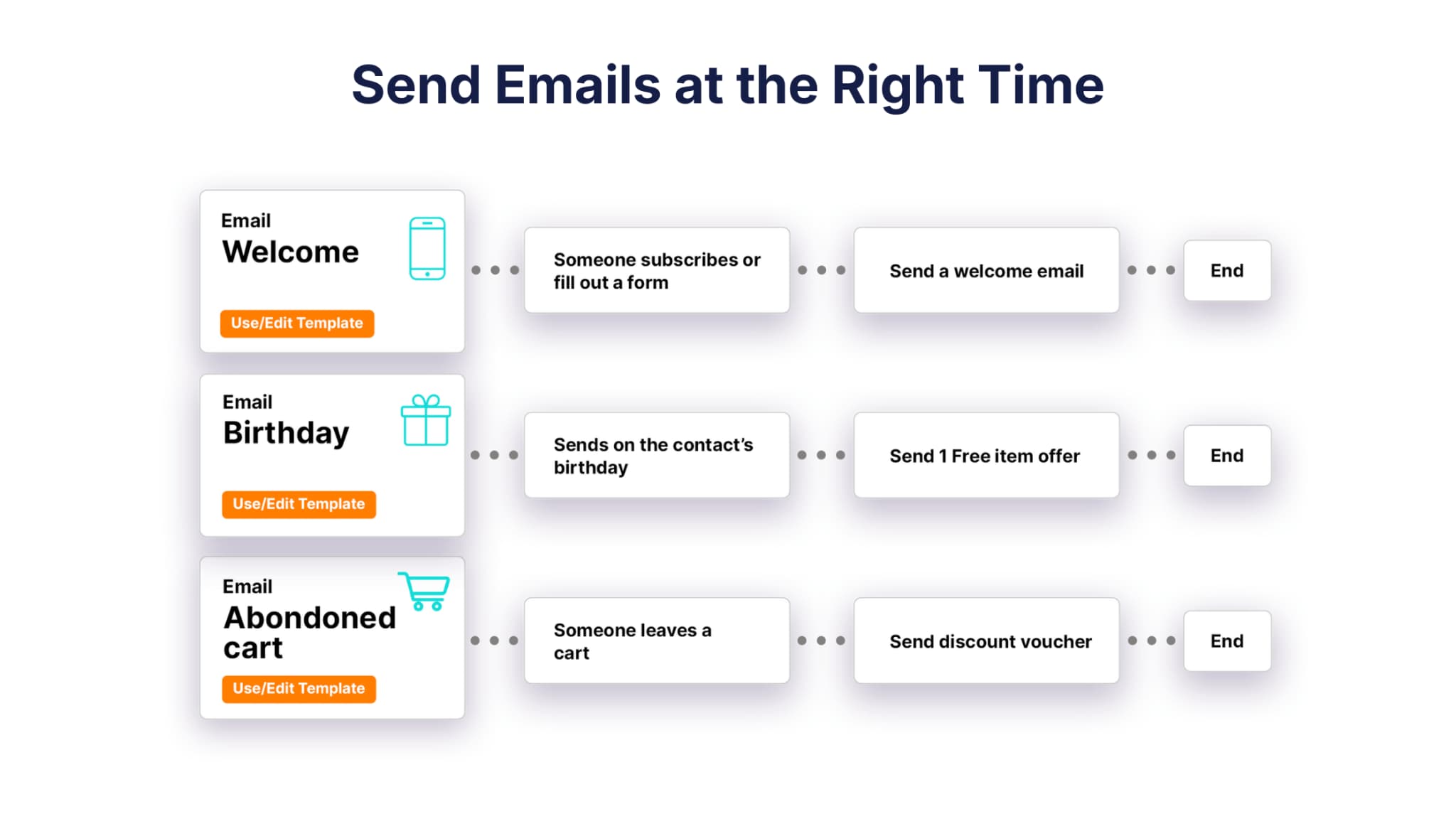
5. Send Emails Based on Behavior, Not Guesswork
If you have ever tried to find the “perfect time” to send an email, you already know how unpredictable inbox habits can be. People read emails when it fits their day, not when a generic best‑practice chart tells them to. That is why timing based on behavior almost always outperforms timing based on the clock. So let’s walk through this in a way that actually matches how your audience behaves.
Here’s where this matters. When someone views a key page, fills out a form, or clicks something meaningful, they are already thinking about that topic. Their attention is warm. A well‑timed follow‑up in that moment feels natural, even helpful. Compare that to a scheduled blast that arrives hours or days later, when their interest has cooled. You can guess which one gets opened.
Behavior-based timing also reduces noise. You are not sending more emails; you are sending the right ones at the right time. You’ve probably seen this in action when you receive an email immediately after taking a step on a website. It feels like a continuation of what you were doing, not an interruption.
Here are a few simple habits that make behavior‑based sending much smoother.
- Automate sending based on actions
- Account for time zones
- Track when each segment tends to open messages
You can build, adjust, and refine these triggers inside your Marketing Automation tool. When you let behavior guide your timing, your emails feel more like a natural follow‑up and less like a scheduled blast. And that shift alone can make a real difference in how often people open, read, and act on what you send.
To make this easier to apply, here is a quick look at common behaviors and why they tend to signal strong engagement.
Even with strong timing, your results will slip if your list isn’t healthy, so let’s look at how to maintain it.
6. Keep Your List Clean and Engaged
If you have ever watched your open rates slowly slip for no obvious reason, your list hygiene was probably involved. A bloated list full of outdated or unengaged contacts works against you. Inbox providers view low engagement as a sign that your content is losing relevance, which means more of your emails are pushed into spam or filtered to low-priority tabs. So let’s walk through this in a straightforward way.
Here’s where this matters. A clean list gives you a more accurate picture of what your audience actually cares about. When your list is filled with people who never open or engage, your metrics get muddy. You end up guessing rather than seeing what is really happening. By keeping your list healthy, you get clearer signals and better deliverability, which leads to stronger overall performance.
List Hygiene Checklist
Here are the steps most teams use to keep their lists clean without overthinking it.
- Remove inactive subscribers after 90 to 180 days
- Validate new emails
- Avoid role-based addresses like info@ or support@
- Suppress high-bounce contacts
You’ve probably seen how refreshing it feels when you declutter something in your business. List hygiene works the same way. A lean, accurate list gives your emails a better shot at reaching people who genuinely want to hear from you. And once you get into the habit, maintaining that health becomes a natural part of your email marketing processes. You can track patterns and trends inside Pulse Reporting to stay ahead of issues before they snowball.
To make this easier, many teams group subscribers by engagement level. It helps you understand who is actively following along and who may need a nudge or a polite goodbye.
A clean list helps, but people still need a reason to open your messages, which brings us to content.
7. Create Emails People Want to Open
If you have ever opened an email and thought, “Finally, something useful,” you already understand what makes great content work. People do not open emails because they look pretty. They open them because the message feels relevant, timely, and worth a minute of their day. So let’s talk about how to create content that earns that reaction more often.
Here’s where this matters. Your readers are busy, and their inboxes show it. When you send something that helps them solve a problem, take the next step, or think, “This is exactly what I needed,” they start trusting your emails. Over time, that trust becomes a pattern. Your messages get opened more consistently because your readers know you respect their time.
A good place to start is by focusing on content that people can use right away. Checklists, quick tips, or short insights fit naturally into busy schedules. Stories can help too, especially when they show a simple before-and-after moment that readers recognize from their own work. The key is to keep things focused. One email, one clear takeaway.
Here are a few formats that consistently resonate with busy readers.
- Short checklists
- Actionable tips
- Customer stories
- Behavior-based recommendations
To make planning easier, here is a simple breakdown of content types and how they tend to perform.
If you want your emails to become something readers look forward to, keep the focus on usefulness. When each message helps someone make progress, even in a small way, your emails start to feel less like marketing and more like a reliable part of their routine.
Once your content resonates, the final step is scaling that consistency without adding more work.
8. Use Automation to Send Timely, Behavior-Based Emails
You’ve probably noticed that the emails you open most often are the ones that show up at just the right moment. That is exactly what automation helps you do. Instead of guessing when someone might be ready to engage, you let their behavior guide the timing. It feels more natural for them, and a lot less stressful for you.
Here’s where this matters. When someone visits a key page, submits a form, or takes any step that signals interest, they are paying attention at that moment. An automated follow-up meets them in that moment. Compare that to a scheduled newsletter that arrives long after their interest has cooled. The difference in engagement is usually clear.
Automation also lightens your workload. Once a workflow is set up, it runs quietly in the background and adapts to each person’s actions. You stay consistent without having to remember every follow-up. And consistency is one of the biggest factors in maintaining healthy engagement over the long run.
Here are some workflow types that tend to deliver reliable engagement.
- Lead nurturing sequences
- Webinar reminders
- Follow-up workflows
- Customer onboarding
You can build and fine-tune these workflows inside Marketing Automation. Once automation is in place, your emails stop feeling like one-off blasts and become thoughtful follow-ups. And that shift not only boosts open rates, but it also makes your whole communication system easier to manage.
To help you map out your options, here is a quick overview of common workflow types and the situations they support.
You can configure and refine these workflows inside your Marketing Automation tool to ensure each message is sent at the most relevant time.
